
Key Issues to Watch for in Vancouver CCTV Installations

Key Issues Homeowners Face With CCTV Installations in Vancouver: What You Need to Know
Installing CCTV at a Vancouver home is more than choosing a camera — it involves privacy rules, network planning, weatherproofing and thoughtful mounting. Get these wrong and you’ll waste time and money. This guide walks Vancouver homeowners through the practical issues to expect, clarifies legal responsibilities, outlines common technical faults, and gives straightforward maintenance steps to keep systems working. You’ll learn how PIPEDA and local privacy norms shape where cameras should point, why proper wiring and sealing extend equipment life, and when wireless systems are a sensible choice for Lower Mainland properties. Read on for quick legal facts, common DIY mistakes and professional fixes, a troubleshooting checklist, wireless trade-offs, and simple maintenance routines tailored to Vancouver’s climate.
What Are the Legal and Privacy Considerations for Home CCTV in Vancouver?

Home CCTV raises privacy and legal issues because cameras record personal data and can capture neighbours, sidewalks and shared strata spaces. PIPEDA and provincial guidance set expectations for how recorded images should be handled — treat footage as personal data, limit collection to what’s necessary, and secure access. Audio is especially sensitive and often needs explicit consent, so many homeowners turn audio off to reduce risk. Practical steps include clear signage where cameras cover shared areas, angling cameras to avoid private spaces, and locking down cloud or local storage with strong credentials. Below are the core legal points to check before you install cameras in Vancouver.
Quick legal facts for Vancouver CCTV and privacy:PIPEDA and provincial guidance consider recorded images personal information when they can identify people.Do not record into neighbours’ private windows or private interiors without consent.Recording audio increases legal risk and frequently requires consent.Use clear signs in shared or semi-public areas so people know they’re being monitored.
How Do Vancouver's Privacy Laws and PIPEDA Affect Home Security Cameras?
PIPEDA and provincial guidance govern how personal information collected by cameras is stored, retained and accessed. Practically, that means you should limit what you record, protect footage with strong passwords and access controls, and avoid keeping recordings indefinitely without a reason. Simple examples: don’t point cameras into a neighbour’s backyard or bedroom window, and enable multi-factor authentication on cloud accounts. Actionable dos and don’ts: do secure storage and set reasonable retention periods; do post signage where appropriate; don’t intentionally capture private interiors or record audio without consent. Following these steps reduces privacy risk while keeping your system effective.
Where Can Homeowners Legally Point Their CCTV Cameras in Vancouver?
Generally you can point cameras at your own property — driveways, front doors and areas where you have a security interest. Avoid aiming cameras at neighbours’ private spaces, bedroom windows or interiors that have a reasonable expectation of privacy. Public sidewalks and streets usually carry lower privacy expectations, but excessive capture of bystanders can still trigger complaints; aim cameras to focus on your entrance and property line to minimize spillover. In strata or shared-property settings, check bylaws and get any required approvals. Practical placement tips: angle cameras slightly downward, use narrower fields of view near boundaries, and add signage in shared areas to reduce disputes and keep good neighbour relations.
What Are the Most Common CCTV Installation Mistakes Vancouver Homeowners Should Avoid?
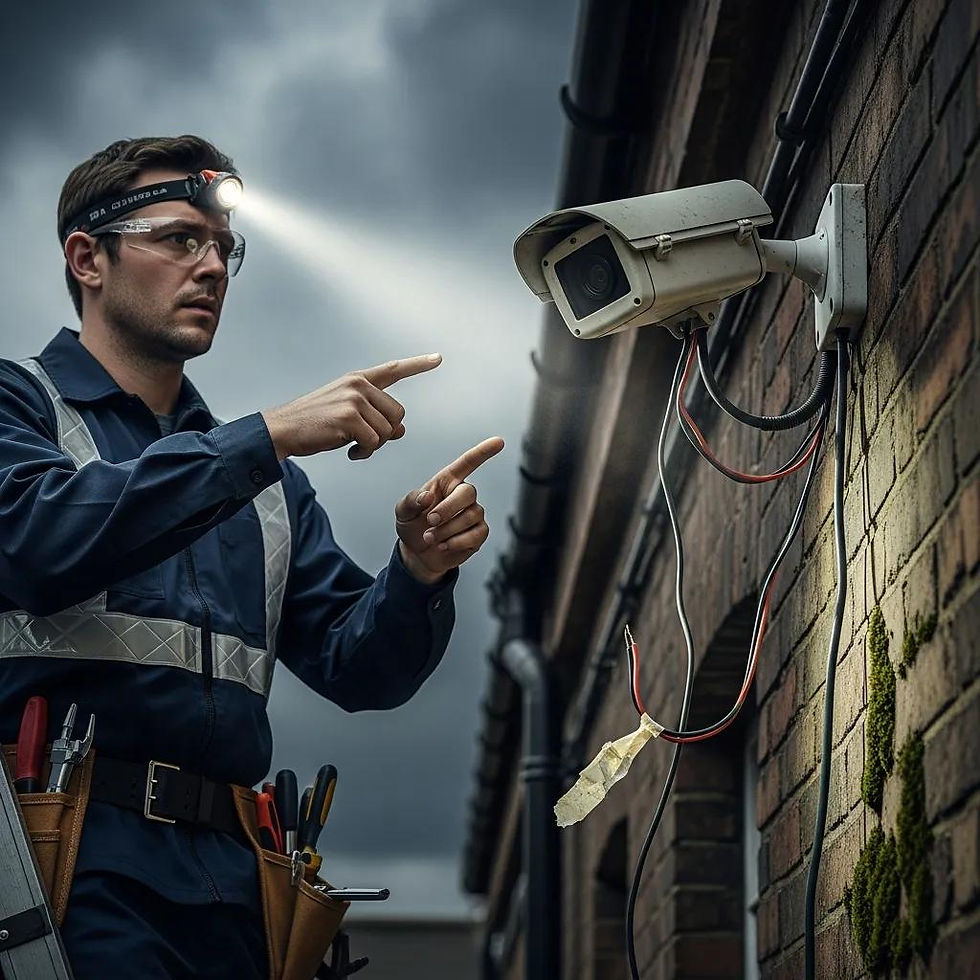
Rushed DIY installs and poor planning are frequent causes of CCTV failure in Vancouver. Mistakes like bad placement, wrong cabling and weak weatherproofing shorten system life. Homeowners often misjudge field of view, cable gauge and protection needs, or they pick hardware with insufficient IP rating for coastal weather. The sections below explain blind spots, wiring and waterproofing failures, followed by a concise table showing typical mistakes, why they happen, and professional fixes.
Common installation mistakes and professional remedies:
Blind spots from poor placement: Mounting too low or using the wrong lens leaves gaps; reposition cameras or add wider-angle/extra units.
Improper wiring and weak seals: Low-grade cable or unsealed junctions lead to corrosion and failure; use outdoor-rated cable and sealed junction boxes.
Over-reliance on weak WiFi: Putting wireless cameras where signal is poor causes dropouts; consider PoE or a dedicated mesh network.
These fixes show why a proper site assessment and the right hardware pay off for long-term reliability.
Intro to the EAV table: The table below compares common installation mistakes, their causes, and the fixes homeowners should expect from licensed installers.
Issue | Typical Cause | Professional Fix |
Blind spots | Poor camera angle or insufficient coverage planning | Reposition cameras, add overlapping coverage and test at night |
Cable failure | Non-outdoor cable, poor strain relief or exposed connectors | Run outdoor-rated cable, use proper gland seals and conduit |
Water ingress | Poor junction sealing or incorrect IP-rated housing | Install IP66/67 enclosures, seal penetrations and add drip loops |
Summary: Fixing these issues during installation prevents repeated faults and protects your footage — another reason to consider professional installation, warranties and proper weatherproofing.
How Does Poor Camera Placement Create Blind Spots and Security Risks?
Poor placement creates blind spots when installers don’t account for a camera’s field of view, mounting height or how people move around the property. That lets intruders approach unseen or hides important approach angles. For example, mounting under an eave with a narrow lens can miss low-level approaches or side doors; failing to test at night can expose IR reflection problems that obscure details. Placement tips: mount cameras about 8–10 feet high where possible, angle them to capture faces at entry points, and overlap adjacent cameras to eliminate gaps. A quick checklist: walk approach routes, test at dawn/dusk, and review recorded clips to confirm consistent identification quality.
Why Is Professional Wiring and Waterproofing Crucial for CCTV Reliability?
Moisture intrusion, corrosion and mechanical strain are common failure points in Vancouver’s wet climate. Professional wiring uses correct PoE switches or properly sized DC runs, strain relief, and sealed connections so cable runs resist water and rodents. Choose appropriate IP ratings (for example IP66 or IP67 for exposed sites) and seal cable entries with grommets to avoid leaks that void warranties and cause intermittent faults. Professional cabling improves uptime, simplifies diagnostics and preserves warranty coverage; DIY runs often raise lifetime costs through repeated repairs.
How Can Homeowners Troubleshoot Common Security Camera Problems in Vancouver?
Systematic troubleshooting cuts unnecessary service calls and helps pinpoint whether issues are power, network, firmware or storage related. Follow a diagnostic order: check power, inspect cables and connectors, verify PoE or adapter voltages, then test network connectivity and bandwidth. Image and storage checks are also important: clean lenses, watch for IR reflection, confirm bitrate settings and review retention rules. Below is a step-by-step checklist to run before calling a technician — doing this helps you describe the problem clearly if you need to escalate.
Check power: Confirm the camera is powered by checking PoE switch LEDs or the external adapter output.
Inspect cabling and connectors: Look for corrosion, water intrusion or damaged sheathing at junctions.
Verify network connectivity: Reboot the router, check IP addresses and run a speed test on the camera’s subnet.
Update firmware: Ensure camera and NVR firmware match vendor recommendations; back up settings before updating.
Check storage settings: Review retention rules, overwrite policies and whether motion-triggered recording is set correctly.
Running this sequence shows whether the fault is mechanical, electrical or software-related and points to the next steps.
What Are Typical Power and Connectivity Issues Affecting Home CCTV Systems?
Common problems include failed PoE ports, weak or intermittent WiFi, voltage drops on long DC runs and network congestion on consumer routers handling many devices. Test PoE by swapping ports or connecting a laptop to the switch; check voltage at the camera end if safe to do so. For WiFi cameras use a signal-strength app or a site survey to find choke points. Fixes include relocating the router, switching to wired PoE, separating heavy traffic onto a guest SSID or VLAN, and replacing undersized or brittle cabling. If these checks don’t solve it, a licensed technician can run load tests, replace failing components and ensure adequate circuit capacity for stable operation.
How Do Firmware Updates and Storage Management Improve Camera Performance?
Firmware updates and proper storage management boost reliability and security: updates fix bugs, improve compatibility with NVRs/DVRs and close vulnerabilities. Best practice is to back up configurations, read release notes, and apply updates during low-usage windows. Storage management balances resolution, bitrate and retention — higher resolution improves ID quality but shortens retention on fixed drives, so use motion-based recording or tiered archiving to maximize useful footage. Check disk health regularly, set sensible overwrite policies and back up key clips to a local NAS or offline storage to preserve evidence when needed.
What Challenges Do Wireless Security Cameras Present in Vancouver Homes?
Wireless cameras make installation easier but introduce challenges from interference, battery limits and potential security gaps, especially in dense Vancouver neighbourhoods. WiFi can be disrupted by neighbouring networks, thick walls and building systems, while battery units need lifecycle planning and are less suited for continuous recording. Security risks include default credentials, unpatched firmware and unencrypted streams on older or budget devices. Mitigation includes strong network segmentation and regular updates. The bullets below summarize the pros, cons and mitigations for wireless cameras in Vancouver homes.
Pros and cons of wireless CCTV for Vancouver homeowners:Pros: Quicker install, flexible placement and no trenching.Cons: Signal interference, limited battery runtime and possibly lower sustained bitrate.Mitigation: Use mesh networks, a dedicated SSID for cameras or prefer PoE for critical locations.
Intro to wireless comparison table: The table below contrasts common wireless camera types, their limitations and practical mitigations to help you choose between wired and wireless options.
Camera Type | Typical Limitation | Mitigation Option |
Battery WiFi cameras | Limited runtime, spotty connections | Use solar or AC power, schedule recordings and place near strong signal |
WiFi mains-powered cameras | Interference and bandwidth contention | Use a dedicated SSID, plan channels and add mesh extenders |
Wired PoE cameras with wireless backup | Higher installation cost | Deploy as a hybrid: wired primary with wireless redundancy |
Summary: The right choice depends on coverage priorities, reliability needs and how much you’re willing to trade installation convenience for long-term stability.
How Does WiFi Interference Impact Wireless CCTV Signal Strength and Reliability?
WiFi interference reduces reliability because overlapping channels, neighbour networks and physical obstructions lower the signal-to-noise ratio and cause packet loss or latency. Diagnose issues by scanning channels with a WiFi analyzer, testing signal at the planned mount point and temporarily moving the camera closer to the access point. Solutions include using the less-congested 5 GHz band where supported, deploying dedicated access points or mesh extenders for camera networks, or switching critical cameras to wired PoE for consistent throughput. These steps cut dropouts and improve recorded footage quality and timeliness.
What Are the Security Risks and Battery Limitations of Wireless Cameras?
Wireless cameras can be exposed if default credentials remain unchanged, passwords are weak or firmware is out of date; battery models add the challenge of keeping power consistent, which undermines continuous surveillance. Hardening steps include changing default logins, enabling encryption and multi-factor authentication when available, and keeping firmware current. For batteries, plan replacement cycles, use motion-activated recording to save power and consider solar or wired options for priority areas. If you need uninterrupted recording and high reliability, wired PoE is usually the better choice for main entrances and long-term evidence retention.
How Can Homeowners Maximize the Value and Longevity of Their CCTV Systems?
To get the most value and longevity from your CCTV, combine proper installation, regular maintenance and smart integration with home systems. Right hardware, routine checks and professional installation reduce failures, preserve warranties and improve footage usefulness. Smart-home integration and periodic professional inspections help systems perform consistently in Vancouver’s weather. The table below lists maintenance tasks, recommended frequency and the benefit so you can prioritize DIY checks and decide when to call a pro.
Maintenance Task | Frequency / Priority | Expected Benefit |
Lens cleaning & position check | Quarterly | Clearer images and corrected angles |
Firmware & credential review | Every 3 months | Stronger security and bug fixes |
Cable and seal inspection | Annually or after storms | Prevents water ingress and corrosion |
Storage health & retention audit | Semi-annually | Ensures enough archival capacity |
This comparison highlights the tasks that deliver the most uptime and security value, helping you balance DIY upkeep with professional service.
Why Is Professional Installation a Smart Investment for Vancouver Homeowners?
Professional installation pays off because licensed, insured technicians provide site assessments, pick the right hardware and follow installation practices that reduce legal risk and long-term failures. Pros understand building details, select appropriate IP-rated housings, run clean cable routes, preserve warranties and advise on privacy-compliant camera orientation — all of which lower lifecycle cost despite higher upfront spend. Many Vancouver providers offer turnkey packages (2, 4, 6 and 8 cameras), plus custom work, upgrades and repairs, and standard benefits like fast installs, licensed technicians, a money-back guarantee and short-term warranties. If you want a fast, supported installation, you can book an on-site quote and installation with Best Canadian Security for a site-assessed design and formal estimate.
What Maintenance Practices Extend the Lifespan of Residential CCTV Systems?
Key maintenance practices that prolong system life include scheduled lens cleaning, seasonal checks of seals and housings, regular firmware updates and storage audits to prevent disk failures. After heavy rain or storms, inspect seals and junction boxes and confirm drip loops and drainage are intact; coastal salt air may require more frequent checks. Homeowner tasks like wiping lenses, confirming recording schedules and reviewing motion settings can be done quarterly; technicians can manage cable replacement, power audits and NVR health checks annually. Combining simple homeowner maintenance with a yearly professional inspection gives the best value and system longevity.
When you’re ready to act, consider a professional site assessment that produces a design and formal estimate — you can book on-site quotes and installations with Best Canadian Security to secure a compliant, weatherproof design and installer-backed warranty.
Frequently Asked Questions
What are the benefits of using wired CCTV systems over wireless ones in Vancouver?
Wired systems generally offer more stable connections and higher sustained bandwidth, which means better video quality and reliable continuous recording — important in denser Vancouver neighbourhoods. They’re also less exposed to WiFi interference and typically harder to breach than WiFi-only setups. For homeowners focused on reliability and evidence-quality footage, wired (PoE) systems are usually the preferred option.
How can homeowners ensure their CCTV footage is secure from unauthorized access?
Protect footage by using unique, strong passwords and enabling two-factor authentication where possible. Keep firmware up to date, use encrypted storage or cloud services that meet privacy standards, and limit account access to trusted people. Regularly review access logs and rotate credentials if someone leaves the household or service provider. These steps significantly reduce the risk of unauthorized access.
What should homeowners consider when choosing the location for their CCTV cameras?
Pick locations that cover entry points, driveways and likely approach paths, while avoiding angles that point into neighbours’ private spaces. Consider field of view, mounting height to capture faces, and tamper resistance. Walk the routes people would take, test the view at various times of day and add signage where cameras cover shared spaces. These precautions improve identification and reduce neighbour complaints.
How often should homeowners perform maintenance on their CCTV systems?
Do basic maintenance quarterly: clean lenses, check views and confirm connections. Inspect seals and junction boxes annually or after storms, and review firmware and storage policies every three to six months. Sticking to a simple schedule keeps performance consistent and prevents small issues from becoming big problems.
What are the implications of not complying with privacy laws regarding CCTV usage?
Non-compliance can lead to fines, civil claims and strained neighbour relations. Violating privacy standards like PIPEDA — for example by recording private interiors or audio without consent — can expose you legally and damage your reputation. Avoid these risks by following placement guidance, posting signage where needed and handling footage securely.
What are the signs that a CCTV system may need professional servicing?
Call a pro if you see inconsistent video quality, frequent disconnections, complete system failures, visible damage to cameras or wiring, persistent error messages, or storage issues. If basic troubleshooting doesn’t help, a licensed technician can diagnose deeper electrical, network or hardware faults and recommend lasting repairs.
Conclusion
Knowing the legal, technical and practical challenges of CCTV installations in Vancouver helps you choose a system that protects your home without creating privacy or reliability problems. Address common pitfalls up front, follow best practices and keep a simple maintenance routine to ensure a dependable system. If you’d like expert help, book a professional site assessment to get a custom design and estimate — and secure your home with confidence.
Comments